
Additional_Resources
Introduction and Environment Setup
How to figure out my Snowflake Account URL?
The easiest way is to take a look at your Snowflake Registration email and copy the string before .snowflakecomputing.com. In my case, this is frgcsyo-ie17820. Keep in mind that sometimes URLs include the .aws tag, too, such as frgcsyo-ie17820.aws. This isn't simple, I know. Even dbt Labs has its own section on how to figure it out.
Automated Snowflake Setup
I encourage you to go through the automated Snowflake Setup as importing the data and setting the permissions from scratch might take quite some time. Follow the instructions here https://bit.ly/dbt-course-setup to set up your Snowflake database with a click of a button!
Snowflake data import (manual)
Only execute these commands if you decided to skip the Automated Snowflake Setup.
Resources presented:
Copy these SQL statements into a Snowflake Worksheet, fill in the public key, select all and execute them (i.e. pressing the play button).
-- Set up the defaults
CREATE WAREHOUSE IF NOT EXISTS COMPUTE_WH;
USE WAREHOUSE COMPUTE_WH;

CREATE DATABASE IF NOT EXISTS AIRBNB;
CREATE SCHEMA IF NOT EXISTS AIRBNB.RAW;
CREATE SCHEMA IF NOT EXISTS AIRBNB.DEV;

USE DATABASE AIRBNB;
USE SCHEMA RAW;

-- Create our three tables and import the data from S3
CREATE OR REPLACE TABLE raw_listings
                    (id integer,
                     listing_url string,
                     name string,
                     room_type string,
                     minimum_nights integer,
                     host_id integer,
                     price string,
                     created_at datetime,
                     updated_at datetime);

COPY INTO raw_listings (id,
                        listing_url,
                        name,
                        room_type,
                        minimum_nights,
                        host_id,
                        price,
                        created_at,
                        updated_at)
                   from 's3://dbt-datasets/listings.csv'
                    FILE_FORMAT = (type = 'CSV' skip_header = 1
                    FIELD_OPTIONALLY_ENCLOSED_BY = '"');

CREATE OR REPLACE TABLE raw_reviews
                    (listing_id integer,
                     date datetime,
                     reviewer_name string,
                     comments string,
                     sentiment string);

COPY INTO raw_reviews (listing_id, date, reviewer_name, comments, sentiment)
                   from 's3://dbt-datasets/reviews.csv'
                    FILE_FORMAT = (type = 'CSV' skip_header = 1
                    FIELD_OPTIONALLY_ENCLOSED_BY = '"');

CREATE OR REPLACE TABLE raw_hosts
                    (id integer,
                     name string,
                     is_superhost string,
                     created_at datetime,
                     updated_at datetime);

COPY INTO raw_hosts (id, name, is_superhost, created_at, updated_at)
                   from 's3://dbt-datasets/hosts.csv'
                    FILE_FORMAT = (type = 'CSV' skip_header = 1
                    FIELD_OPTIONALLY_ENCLOSED_BY = '"');
Snowflake user creation
Only execute these commands if you decided to skip the Automated Snowflake Setup.
Copy these SQL statements into a Snowflake Worksheet, fill in the public key, select all and execute them (i.e. pressing the play button).
-- Use an admin role
USE ROLE ACCOUNTADMIN;

-- Create the `transform` role
DROP ROLE IF EXISTS TRANSFORM;
CREATE ROLE TRANSFORM;
GRANT ROLE TRANSFORM TO ROLE ACCOUNTADMIN;

-- Create the default warehouse if necessary
GRANT OPERATE ON WAREHOUSE COMPUTE_WH TO ROLE TRANSFORM;

-- Create the `dbt` user and assign to role
DROP USER IF EXISTS dbt;
CREATE USER IF NOT EXISTS dbt
  LOGIN_NAME='dbt'
  TYPE=SERVICE
  RSA_PUBLIC_KEY="<<Add Your Public Key File's content here>>"
  DEFAULT_ROLE=TRANSFORM
  DEFAULT_WAREHOUSE='COMPUTE_WH'
  DEFAULT_NAMESPACE='AIRBNB.RAW'
  COMMENT='DBT user used for data transformation';

GRANT ROLE TRANSFORM to USER dbt;

-- Set up permissions to role `transform`
GRANT ALL ON WAREHOUSE COMPUTE_WH TO ROLE TRANSFORM;
GRANT ALL ON DATABASE AIRBNB to ROLE TRANSFORM;
GRANT ALL ON ALL SCHEMAS IN DATABASE AIRBNB to ROLE TRANSFORM;
GRANT ALL ON FUTURE SCHEMAS IN DATABASE AIRBNB to ROLE TRANSFORM;
GRANT ALL ON ALL TABLES IN SCHEMA AIRBNB.RAW to ROLE TRANSFORM;
GRANT ALL ON FUTURE TABLES IN SCHEMA AIRBNB.RAW to ROLE TRANSFORM;

-- Create the user and permissions for Preset.io
USE ROLE ACCOUNTADMIN;

DROP ROLE IF EXISTS REPORTER;
CREATE ROLE REPORTER;

DROP USER IF EXISTS PRESET;
CREATE USER PRESET
  LOGIN_NAME='preset'
  TYPE=SERVICE
  RSA_PUBLIC_KEY="<<Add Your Public Key File's content here>>"
  DEFAULT_WAREHOUSE='COMPUTE_WH'
  DEFAULT_ROLE=REPORTER
  DEFAULT_NAMESPACE='AIRBNB.DEV'
 COMMENT='Preset user for creating reports';

GRANT ROLE REPORTER TO USER PRESET;
GRANT ROLE REPORTER TO ROLE ACCOUNTADMIN;
GRANT ALL ON WAREHOUSE COMPUTE_WH TO ROLE REPORTER;
GRANT USAGE ON DATABASE AIRBNB TO ROLE REPORTER;
GRANT USAGE ON ALL SCHEMAS IN DATABASE AIRBNB to ROLE REPORTER;
GRANT USAGE ON FUTURE SCHEMAS IN DATABASE AIRBNB to ROLE REPORTER;
GRANT SELECT ON ALL TABLES IN SCHEMA AIRBNB.DEV to ROLE REPORTER;
GRANT SELECT ON FUTURE TABLES IN SCHEMA AIRBNB.DEV to ROLE REPORTER;
Python and Virtualenv setup, and dbt installation - Windows
Python
You want to use Python 3.12 as this is the most recent version that is compatible with every database adapter, Snowflake included.
https://www.python.org/downloads/release/python-31211/
Please make sure that you work with Python 3.12 as newer versions of python might not be compatible with some of the dbt packages.
Virtualenv setup
Here are the commands we executed in this lesson:
cd Desktop
mkdir course
cd course

python -m venv venv
# Windows:
venv\Scripts\activate
# Mac:
source venv/bin/activate
Virtualenv setup and dbt installation - Mac
iTerm2
We suggest you use iTerm2 instead of the built-in Terminal application.
dbt installation
Supported Python Versions: https://docs.getdbt.com/faqs/Core/install-python-compatibility
Here are the commands we execute in this lesson:
mkdir course
cd course
virtualenv venv
. venv/bin/activate
python --version
pip install dbt-snowflake==1.10.2
dbt --version
Create a dbt project (all platforms):
dbt init --skip-profile-setup airbnb
dbt 1.10 Compatibility Notes
In dbt 1.10 and later:
- Use
data_tests:instead oftests:for column tests - Test parameters must be wrapped under the
arguments:property - The
require_generic_test_arguments_propertyflag is no longer needed
Models
Code used in the lesson
SRC Listings
models/src/src_listings.sql:
WITH raw_listings AS (
    SELECT
        *
    FROM
        AIRBNB.RAW.RAW_LISTINGS
)
SELECT
    id AS listing_id,
    name AS listing_name,
    listing_url,
    room_type,
    minimum_nights,
    host_id,
    price AS price_str,
    created_at,
    updated_at
FROM
    raw_listings
SRC Reviews
models/src/src_reviews.sql:
WITH raw_reviews AS (
    SELECT
        *
    FROM
        AIRBNB.RAW.RAW_REVIEWS
)
SELECT
    listing_id,
    date AS review_date,
    reviewer_name,
    comments AS review_text,
    sentiment AS review_sentiment
FROM
    raw_reviews
Exercise
Create a model which builds on top of our raw_hosts table.
- Call the model
models/src/src_hosts.sql - Use a CTE (common table expression) to define an alias called
raw_hosts. This CTE selects every column from the raw hosts tableAIRBNB.RAW.RAW_HOSTS - In your final
SELECT, select every column and record fromraw_hostsand rename the following columns:idtohost_idnametohost_name
Solution
WITH raw_hosts AS (
    SELECT
        *
    FROM
       AIRBNB.RAW.RAW_HOSTS
)
SELECT
    id AS host_id,
    NAME AS host_name,
    is_superhost,
    created_at,
    updated_at
FROM
    raw_hosts
Models
Code used in the lesson
DIM Listings
models/dim/dim_listings_cleansed.sql:
WITH src_listings AS (
  SELECT
    *
  FROM
    {{ ref('src_listings') }}
)
SELECT
  listing_id,
  listing_name,
  room_type,
  CASE
    WHEN minimum_nights = 0 THEN 1
    ELSE minimum_nights
  END AS minimum_nights,
  host_id,
  REPLACE(
    price_str,
    '$'
  ) :: NUMBER(
    10,
    2
  ) AS price,
  created_at,
  updated_at
FROM
  src_listings
DIM hosts
models/dim/dim_hosts_cleansed.sql:
{{
  config(
    materialized = 'view'
    )
}}

WITH src_hosts AS (
    SELECT
        *
    FROM
        {{ ref('src_hosts') }}
)
SELECT
    host_id,
    NVL(
        host_name,
        'Anonymous'
    ) AS host_name,
    is_superhost,
    created_at,
    updated_at
FROM
    src_hosts
Exercise
Create a new model in the models/dim/ folder called dim_hosts_cleansed.sql.
- Use a CTE to reference the
src_hostsmodel - SELECT every column and every record, and add a cleansing step to host_name:
- If host_name is not null, keep the original value
- If host_name is null, replace it with the value ‘Anonymous’
- Use the NVL(column_name, default_null_value) function
Execute
dbt runand verify that your model has been created
Solution
WITH src_hosts AS (
    SELECT
        *
    FROM
        {{ ref('src_hosts') }}
)
SELECT
    host_id,
    NVL(
        host_name,
        'Anonymous'
    ) AS host_name,
    is_superhost,
    created_at,
    updated_at
FROM
    src_hosts
Incremental Models
The fct/fct_reviews.sql model:
{{
  config(
    materialized = 'incremental',
    on_schema_change='fail'
    )
}}
WITH src_reviews AS (
  SELECT * FROM {{ ref('src_reviews') }}
)
SELECT * FROM src_reviews
WHERE review_text is not null

{% if is_incremental() %}
  AND review_date > (select max(review_date) from {{ this }})
{% endif %}
Get every review for listing 3176:
SELECT * FROM "AIRBNB"."DEV"."FCT_REVIEWS" WHERE listing_id=3176;
Add a new record to the table:
INSERT INTO "AIRBNB"."RAW"."RAW_REVIEWS"
VALUES (3176, CURRENT_TIMESTAMP(), 'Zoltan', 'excellent stay!', 'positive');
Making a full-refresh:
dbt run --full-refresh
DIM listings with hosts
The contents of dim/dim_listings_w_hosts.sql:
WITH
l AS (
    SELECT
        *
    FROM
        {{ ref('dim_listings_cleansed') }}
),
h AS (
    SELECT *
    FROM {{ ref('dim_hosts_cleansed') }}
)

SELECT
    l.listing_id,
    l.listing_name,
    l.room_type,
    l.minimum_nights,
    l.price,
    l.host_id,
    h.host_name,
    h.is_superhost as host_is_superhost,
    l.created_at,
    GREATEST(l.updated_at, h.updated_at) as updated_at
FROM l
LEFT JOIN h ON (h.host_id = l.host_id)
Dropping the views after ephemeral materialization
DROP VIEW AIRBNB.DEV.SRC_HOSTS;
DROP VIEW AIRBNB.DEV.SRC_LISTINGS;
DROP VIEW AIRBNB.DEV.SRC_REVIEWS;
Sources and Seeds
Full Moon Dates CSV
Download the CSV from the lesson's Resources section, or download it from the following S3 location: https://dbt-datasets.s3.us-east-2.amazonaws.com/seed_full_moon_dates.csv
Then place it to the seeds folder
If you download from S3 on a Mac/Linux, you can import the CSV straight to your seed folder by executing this command:
curl https://dbt-datasets.s3.us-east-2.amazonaws.com/seed_full_moon_dates.csv -o seeds/seed_full_moon_dates.csv
Contents of models/sources.yml
sources:
  - name: airbnb
    schema: raw
    tables:
      - name: listings
        identifier: raw_listings

      - name: hosts
        identifier: raw_hosts

      - name: reviews
        identifier: raw_reviews
        config:
          loaded_at_field: date
          freshness:
            warn_after: {count: 1, period: hour}
            error_after: {count: 24, period: hour}
Source Freshness
Getting the exit code of the most recent process
# Mac/Linux:
echo $?

# Windows - Command Prompt (cmd)
dir C:\nonexistent
echo %ERRORLEVEL%

# Windows - PowerShell
$LASTEXITCODE
Contents of models/mart/mart_full_moon_reviews.sql
{{ config(
  materialized = 'table',
) }}

WITH fct_reviews AS (
    SELECT * FROM {{ ref('fct_reviews') }}
),
full_moon_dates AS (
    SELECT * FROM {{ ref('seed_full_moon_dates') }}
)

SELECT
  r.*,
  CASE
    WHEN fm.full_moon_date IS NULL THEN 'not full moon'
    ELSE 'full moon'
  END AS is_full_moon
FROM
  fct_reviews
  r
  LEFT JOIN full_moon_dates
  fm
  ON (TO_DATE(r.review_date) = DATEADD(DAY, 1, fm.full_moon_date))
Snapshots
Snapshots for listing
The contents of snapshots/scd_raw_listings.sql:
{% snapshot scd_raw_listings %}

{{
   config(
       target_schema='DEV',
       unique_key='id',
       strategy='timestamp',
       updated_at='updated_at',
       invalidate_hard_deletes=True
   )
}}

select * FROM {{ source('airbnb', 'listings') }}

{% endsnapshot %}
Updating the table
UPDATE AIRBNB.RAW.RAW_LISTINGS SET MINIMUM_NIGHTS=30,
    updated_at=CURRENT_TIMESTAMP() WHERE ID=3176;

SELECT * FROM AIRBNB.DEV.SCD_RAW_LISTINGS WHERE ID=3176;
Snapshots for hosts
The contents of snapshots/scd_raw_hosts.sql:
{% snapshot scd_raw_hosts %}

{{
   config(
       target_schema='dev',
       unique_key='id',
       strategy='timestamp',
       updated_at='updated_at',
       invalidate_hard_deletes=True
   )
}}

select * FROM {{ source('airbnb', 'hosts') }}

{% endsnapshot %}
Tests
Generic Tests
The contents of models/schema.yml:
models:
  - name: dim_listings_cleansed
    columns:

     - name: listing_id
       data_tests:
         - unique
         - not_null

     - name: host_id
       data_tests:
         - not_null
         - relationships:
             arguments:
               to: ref('dim_hosts_cleansed')
               field: host_id

     - name: room_type
       data_tests:
         - accepted_values:
             arguments:
               values: ['Entire home/apt',
                        'Private room',
                        'Shared room',
                        'Hotel room']
Storing Test Failures:
Add this to your dbt_project.yml:
data_tests:
  +store_failures: true
  +schema: _test_failures
Here is the link to Elementary Data if you want to take testing to the next level. :)
Singular test for minimum nights check
The contents of tests/dim_listings_minimum_nights.sql:
SELECT
    *
FROM
    {{ ref('dim_listings_cleansed') }}
WHERE minimum_nights < 1
LIMIT 10
Restricting test execution to a specific test
dbt test -s dim_listings_minimum_nights
Unit Tests
Add this to models/mart/unit_tests.yml:
unit_tests:
  - name: unittest_fullmoon_matcher
    model: mart_fullmoon_reviews
    given:
      - input: ref('fct_reviews')
        rows:
          - {review_date: '2025-01-13'}
          - {review_date: '2025-01-14'}
          - {review_date: '2025-01-15'}
      - input: ref('seed_full_moon_dates')
        rows:
          - {full_moon_date: '2025-01-14'}
    expect:
      rows:
        - {review_date: '2025-01-13', is_full_moon: "not full moon"}
        - {review_date: '2025-01-14', is_full_moon: "not full moon"}
        - {review_date: '2025-01-15', is_full_moon: "full moon"}
Restricting test execution to tests associated with a specific model
dbt test -s mart_fullmoon_reviews
Contracts
Add this to models/schema.yml:
  - name: dim_hosts_cleansed
    config:
        contract:
          enforced: true
    columns:
      - name: host_id
        data_type: integer
      - name: host_name
        data_type: string
      - name: is_superhost
        data_type: string
      - name: updated_at
        data_type: timestamp
      - name: created_at
        data_type: timestamp
Exercise
Create a singular test in tests/consistent_created_at.sql that checks that there is no review date that is submitted before its listing was created: Make sure that every review_date in fct_reviews is more recent than the associated created_at in dim_listings_cleansed.
Solution
SELECT * FROM {{ ref('dim_listings_cleansed') }} l
INNER JOIN {{ ref('fct_reviews') }} r
USING (listing_id)
WHERE l.created_at >= r.review_date
Custom Generic Tests
Add this to tests/generic/positive_values.sql:
{% test positive_values(model, column_name) %}
SELECT * FROM {{ model }} WHERE {{ column_name }} <= 0
{% endtest %}
Macros, Custom Tests and Packages
Macros
The contents of macros/no_nulls_in_columns.sql:
{% macro no_nulls_in_columns(model) %}
    SELECT * FROM {{ model }} WHERE
    {% for col in adapter.get_columns_in_relation(model) -%}
        {{ col.column }} IS NULL OR
    {% endfor %}
    FALSE
{% endmacro %}
The contents of tests/no_nulls_in_dim_listings.sql
{{ no_nulls_in_columns(ref('dim_listings_cleansed')) }}
Custom Generic Tests
The contents of tests/generic/positive_values.sql
{% test positive_values(model, column_name) %}
SELECT * FROM {{ model }} WHERE {{ column_name }} <= 0
{% endtest %}
Setting Test Parameters
The contents of tests/generic/minimum_row_count.sql:
{% test minimum_row_count(model, min_row_count) %}
{{ config(severity = 'warn') }}

SELECT
    COUNT(*) as cnt
FROM
    {{ model }}
HAVING
    COUNT(*) < {{ min_row_count }}
{% endtest %}
Test Severity
Add this to models/schema.yml:
  - name: dim_listings_cleansed
    description: Cleansed table which contains Airbnb listings.
    data_tests:
      - minimum_row_count:
          arguments:
            min_row_count: 1000
          severity: error
Packages
The contents of packages.yml:
packages:
  - package: dbt-labs/dbt_utils
    version: 1.3.0
The contents of models/fct_reviews.sql:
{{
  config(
    materialized = 'incremental',
    on_schema_change='fail'
    )
}}
WITH src_reviews AS (
  SELECT * FROM {{ ref('src_reviews') }}
)
SELECT
  {{ dbt_utils.generate_surrogate_key(['listing_id', 'review_date', 'reviewer_name', 'review_text']) }}
    AS review_id,
  *
  FROM src_reviews
WHERE review_text is not null
{% if is_incremental() %}
  AND review_date > (select max(review_date) from {{ this }})
{% endif %}
Documentation
The models/schema.yml after adding the documentation:
models:
  - name: dim_listings_cleansed
    description: Cleansed table which contains Airbnb listings.
    columns:

      - name: listing_id
        description: Primary key for the listing
        data_tests:
          - unique
          - not_null

      - name: host_id
        description: The host's id. References the host table.
        data_tests:
          - not_null
          - relationships:
              arguments:
                to: ref('dim_hosts_cleansed')
                field: host_id

      - name: room_type
        description: Type of the apartment / room
        data_tests:
          - accepted_values:
              arguments:
                values: ['Entire home/apt', 'Private room', 'Shared room', 'Hotel room']

      - name: minimum_nights
        description: '{{ doc("dim_listing_cleansed__minimum_nights") }}'
        data_tests:
          - positive_values

  - name: dim_hosts_cleansed
    columns:
      - name: host_id
        data_tests:
          - not_null
          - unique

      - name: host_name
        data_tests:
          - not_null

      - name: is_superhost
        data_tests:
          - accepted_values:
              arguments:
                values: ['t', 'f']

  - name: fct_reviews
    columns:
      - name: listing_id
        data_tests:
          - relationships:
              arguments:
                to: ref('dim_listings_cleansed')
                field: listing_id

      - name: reviewer_name
        data_tests:
          - not_null

      - name: review_sentiment
        data_tests:
          - accepted_values:
              arguments:
                values: ['positive', 'neutral', 'negative']
The contents of models/docs.md:
{% docs dim_listing_cleansed__minimum_nights %}
Minimum number of nights required to rent this property.

Keep in mind that old listings might have `minimum_nights` set
to 0 in the source tables. Our cleansing algorithm updates this to `1`.

{% enddocs %}
The contents of models/overview.md:
{% docs __overview__ %}
# Airbnb pipeline
Hey, welcome to our Airbnb pipeline documentation!
Here is the schema of our input data:
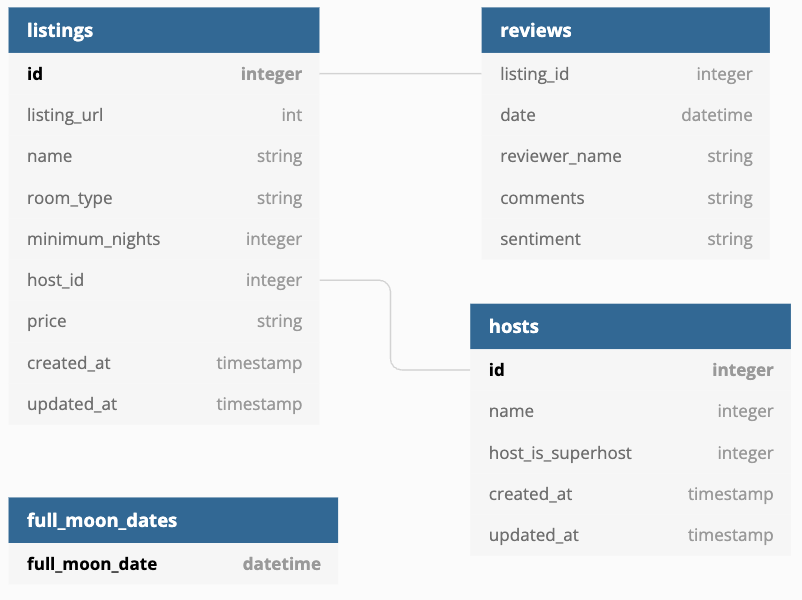
{% enddocs %}
Analyses, Hooks and Exposures
Analyses
The contents of analyses/full_moon_no_sleep.sql:
WITH fullmoon_reviews AS (
    SELECT * FROM {{ ref('mart_fullmoon_reviews') }}
)
SELECT
    is_full_moon,
    review_sentiment,
    COUNT(*) as reviews
FROM
    fullmoon_reviews
GROUP BY
    is_full_moon,
    review_sentiment
ORDER BY
    is_full_moon,
    review_sentiment
Hooks
Changes made to dbt_project.yml:
on-run-start:
  - "CREATE TABLE IF NOT EXISTS {{ target.schema }}.audit_log (
      model_name STRING,
      run_timestamp TIMESTAMP
    )"

models:
  airbnb:
    ...
    +post-hook:
      - "INSERT INTO {{ target.schema }}.audit_log VALUES ('{{ this }}', CURRENT_TIMESTAMP)"
Grants
Add grants to dbt_project.yml:
models:
  airbnb:
    grants:
      select: ["transform", "reporter"]
Creating a Dashboard in Preset
Getting the Snowflake credentials up to the screen:
- Mac / Linux / Windows Powershell:
cat ~/.dbt/profiles.yml - Windows (cmd):
type %USERPROFILE%\.dbt\profiles.yml
Exposures
The contents of models/dashboard.yml:
exposures:
  - name: executive_dashboard
    label: Executive Dashboard
    type: dashboard
    maturity: low
    url: https://00d200da.us1a.app.preset.io/superset/dashboard/x/?edit=true&native_filters_key=fnn_HJZ0z42ZJtoX06x7gRbd9oBFgFLbnPlCW2o_aiBeZJi3bZuyfQuXE96xfgB
    description: Executive Dashboard about Airbnb listings and hosts

    depends_on:
      - ref('dim_listings_w_hosts')
      - ref('mart_fullmoon_reviews')

    owner:
      name: Zoltan C. Toth
      email: dbtstudent@gmail.com
Debugging Tests and Testing with dbt-expectations
- The original Great Expectations project on GitHub: https://github.com/great-expectations/great_expectations
- dbt-expectations: https://github.com/metaplane/dbt-expectations
For the final code in packages.yml, models/schema.yml and models/sources.yml, please refer to the course's Github repo: https://github.com/nordquant/complete-dbt-bootcamp-zero-to-hero
Testing a single model
dbt test --select dim_listings_w_hosts
Testing individual sources:
dbt test --select source:airbnb.listings
Debugging dbt
dbt --debug test --select dim_listings_w_hosts
Keep in mind that in the lecture we didn't use the --debug flag after all, as taking a look at the compiled SQL file is the better way of debugging tests.
Logging
The contents of macros/logging.sql:
{% macro learn_logging() %}
    {{ log("Call your mom!") }}
    {{ log("Call your dad!", info=True) }} {# Logs to the screen, too #}
--  {{ log("Call your dad!", info=True) }} {# This will be logged to the screen #}
    {# log("Call your dad!", info=True) #} {# This won't be executed #}
{% endmacro %}
Executing the macro:
dbt run-operation learn_logging
Variables
The contents of macros/variables.sql:
{% macro learn_variables() %}

    {% set your_name_jinja = "Zoltan" %}
    {{ log("Hello " ~ your_name_jinja, info=True) }}

    {{ log("Hello dbt user " ~ var("user_name", "NO USERNAME IS SET!!") ~ "!", info=True) }}

    {% if var("in_test", False) %}
       {{ log("In test", info=True) }}
    {% else %}
       {{ log("NOT in test", info=True) }}
    {% endif %}

{% endmacro %}
We've added the following block to the end of dbt_project.yml:
vars:
  user_name: default_user_name_for_this_project
An example of passing variables:
dbt run-operation learn_variables --vars "{user_name: zoltanctoth}"
More information on variable passing: https://docs.getdbt.com/docs/build/project-variables
dbt Orchestration
Links to different orchestrators
- dbt integrations
- Apache Airflow
- Prefect
- Prefect dbt Integration
- Azure Data Factory
- dbt Cloud
- Dagster
Dagster
Set up your environment
Let's install the dagster-dbt and the dagster-webserver package. These packages are located in requirements.txt.
pip install -r requirements.txt
Create a dagster project
dagster-dbt project scaffold --project-name my_dbt_dagster_project --dbt-project-dir=airbnb
At this point in the course, open schedules.py and uncomment the schedule logic.
Start dagster
Now that our project is created, start the Dagster server:
On Windows - PowerShell (Like the VSCode Terminal Window)
cd dbt_dagster_project
dagster dev
We will continue our work on the dagster UI at http://localhost:3000/
Making incremental models compatible with orchestrators:
The updated contents of models/fct/fct_reviews.sql:
{{
  config(
    materialized = 'incremental',
    on_schema_change='fail'
    )
}}
WITH src_reviews AS (
  SELECT * FROM {{ ref('src_reviews') }}
)
SELECT
  {{ dbt_utils.generate_surrogate_key(['listing_id', 'review_date', 'reviewer_name', 'review_text']) }} as review_id,
  *
FROM src_reviews
WHERE review_text is not null

{% if is_incremental() %}
  {% if var("start_date", False) and var("end_date", False) %}
    {{ log('Loading ' ~ this ~ ' incrementally (start_date: ' ~ var("start_date") ~ ', end_date: ' ~ var("end_date") ~ ')', info=True) }}
    AND review_date >= '{{ var("start_date") }}'
    AND review_date < '{{ var("end_date") }}'
  {% else %}
    AND review_date > (select max(review_date) from {{ this }})
    {{ log('Loading ' ~ this ~ ' incrementally (all missing dates)', info=True)}}
  {% endif %}
{% endif %}
Passing a time range to our incremental model:
dbt run --select fct_reviews --vars '{start_date: "2024-02-15 00:00:00", end_date: "2024-03-15 23:59:59"}'
Reference - Working with incremental strategies: https://docs.getdbt.com/docs/build/incremental-models#about-incremental_strategy
Data Pipeline Architecture
ETL vs ELT
[!NOTE] The choice between ETL and ELT often depends on the target storage capabilities and latency requirements.
ETL: Extract, Transform, Load
Transform data before loading into the warehouse.
- Best for: Sensitive data masking, legacy systems, strict compliance needs.
- Pros: Clean data in DW, less storage cost.
- Cons: Slower ingestion, rigid pipeline.
ELT: Extract, Load, Transform
Load raw data first, transform in the warehouse.
- Best for: Modern cloud warehouses (Snowflake, BigQuery), rapid ingestion.
- Pros: Speed, flexibility (schema-on-read), raw data always available.
- Cons: higher storage cost, complex transformations in SQL.
graph LR
    subgraph ETL
    S1[Source] --> T[Transform Engine]
    T --> W[Warehouse]
    end
    subgraph ELT
    S2[Source] --> W2[Warehouse Staging]
    W2 --> T2[Transform in DB]
    end
Batch vs Stream Processing
- Batch: Process large volumes at scheduled intervals (e.g., nightly jobs).
- Tools: Apache Spark (Classic), DBT runs.
- Stream: Process data in real-time as it arrives.
- Tools: Kafka, Flink, Spark Structured Streaming.
Data Storage Systems
Data Warehouses
Structured, optimized for analytics.
- Examples: Snowflake, Redshift, BigQuery.
- Characteristics:
- OLAP (Online Analytical Processing) workloads.
- Columnar storage: Optimizes read heavy queries (aggregations).
Data Lakes
Store raw data in native format.
- Examples: AWS S3, HDFS, Azure Data Lake.
- Characteristics:
- Schema-on-read: Structure is applied when data is read.
- Supports structured (CSV, Parquet) & unstructured (JSON, Logs, Images) data.
Lakehouse Architecture
Combines warehouse performance with lake flexibility.
- Core Tech: Open table formats like Delta Lake, Apache Iceberg, Apache Hudi.
- Benefit: ACID transactions on Data Lake storage.
Processing Frameworks
Apache Spark
- Distributed computing for large-scale data processing.
- Key Feature: In-memory processing (much faster than MapReduce).
- Supports both Batch and Streaming.
Apache Kafka
- Distributed streaming platform.
- Use Case: Event sourcing, real-time data pipelines, decoupling systems.
Apache Airflow
- Workflow orchestration and scheduling.
- DAGs (Directed Acyclic Graphs): Define tasks and dependencies as code (Python).
Data Modeling
Dimensional Modeling (Kimball)
- Star Schema: Central Fact Table (metrics) linked to Dimension Tables (context - who, what, where).
- Snowflake Schema: Normalized dimensions (dimensions split into sub-dimensions).
Data Vault
- Hubs (Keys), Links (Relationships), Satellites (Attributes).
- Goal: Flexible enterprise data warehousing handling historical data and source system changes auditably.
Data Quality & Governance
Data Quality Dimensions
- Completeness: Is all data present?
- Accuracy: Is it correct?
- Consistency: Does it match across systems?
- Timeliness: Is it fresh?
Implementation: Data profiling, validation rules (Great Expectations, DBT Tests).
Data Lineage
- Track data flow from source to destination.
- Critical for Impact Analysis (upstream changes) and Debugging (downstream errors).
Schema Evolution
- Capabilities to handle changes in data structure over time without breaking pipelines.
- Strategies: Backward compatibility (new code can read old data), Forward compatibility.
Modern Concepts
Change Data Capture (CDC)
- Capture database changes (Insert, Update, Delete) in real-time from transaction logs.
- Tools: Debezium, AWS DMS.
Data Mesh
- Paradigm Shift: Decentralized data architecture.
- Principles:
- Domain-owned data products.
- Data as a Product.
- Self-serve data infrastructure.
- Federated governance.
DataOps
- Definition: DevOps principles applied to data pipelines.
- Pillars:
- CI/CD for Data pipelines.
- Automated Testing (Data & Code).
- Monitoring & Observability.
- Collaboration.
Key Technologies Setup (Mac/Linux)
| Category | Tools |
|---|---|
| Cloud Platforms | AWS (Glue, EMR), GCP (Dataflow, BigQuery), Azure (Data Factory, Synapse) |
| Containerization | Docker, Kubernetes (Scalable execution) |
| IaC | Terraform, CloudFormation (Reproducible infra) |
Python Data Types and Their Sizes in Memory
ℹ️ Memory size of Python objects can vary depending on the implementation (CPython, PyPy, etc.) and the system architecture (32-bit vs 64-bit). Values below are based on CPython 3.10+ on a 64-bit system using the
sys.getsizeof()function.
📦 Built-in Data Types
| Data Type | Example | Typical Size (Bytes) | Notes |
|---|---|---|---|
int | 42 | 28 (base) | Grows with value size (arbitrary precision) |
float | 3.14 | 24 | Fixed 64-bit double precision |
complex | 1+2j | 32 | Two floats (real + imaginary) |
bool | True | 28 | Subclass of int |
str | "a" | 49 | Varies based on string length |
bytes | b"a" | 33 | One byte + overhead |
bytearray | bytearray(1) | 56 | Mutable bytes |
list | [1, 2, 3] | 88 | Dynamic array; grows with elements |
tuple | (1, 2, 3) | 72 | Fixed-size immutable sequence |
set | {1, 2, 3} | 216 | Unordered, unique items |
frozenset | frozenset() | 216 | Immutable version of set |
dict | {"a": 1} | 232 | Hash map; grows with items |
NoneType | None | 16 | Singleton object |
🔍 Measuring Size in Python
You can use the sys.getsizeof() function to check the size of an object in memory:
import sys

print(sys.getsizeof(0))           # int
print(sys.getsizeof(3.14))        # float
print(sys.getsizeof("Hello"))     # str
print(sys.getsizeof([1, 2, 3]))   # list
Downcasting Large DataFrames in Python
Downcasting in pandas refers to converting data types to smaller, more memory-efficient types to reduce memory usage and improve performance.
Why Downcast DataFrames?
Large datasets can consume significant memory if default types like int64 or float64 are used unnecessarily. Downcasting:
- Reduces RAM usage
- Speeds up data processing
- Makes DataFrames more efficient to store or transmit
Example
Before downcasting:
import pandas as pd
import numpy as np

df = pd.DataFrame({
    'int_col': np.random.randint(0, 100, size=1_000_000),
    'float_col': np.random.rand(1_000_000)
})

print(df.info(memory_usage='deep'))